
- +1
【双语话个税】一文搞定个税APP年度汇算更正&作废申报操作!
【双语话个税】
一文搞定个税APP年度汇算更正&作废申报操作!
年度汇算更正&作废申报操作篇
(Instruction about Correction and Cancellation of Individual Income Tax Annual Settlement)
问:上个月我在个税APP上完成了2023年度个税汇算,但是我发现专项附加扣除信息填错了,要怎么办呢?
(Q: I completed the annual individual income tax settlement of 2023 last month on the APP. But recently I realized that I made some mistakes in filing special additional deduction information. What shall I do now? )
答:通过个税APP完成汇算后,如发现存在申报有误等情况,可以通过个税APP进行更正申报或作废申报。一起来看下怎么操作吧!
(A:If there is any mistake in the declaration, individuals can correct or cancel the declaration on Individual Income Tax App. Let’s have a look at the operation step by step. )
01
查看申报记录详情
(Check the Details
of Declaration)
方法1(Method 1)
登录个人所得税APP,在首页【2023综合所得年度汇算】专题页点击【查看记录】,可以查看2023综合所得年度汇算的申报记录详情。
(Log in to Individual Income Tax App, click on [Check the Record] in the thematic area titled [2023 Comprehensive Individual Income Annual Settlement] on the homepage to view the details of your declaration.)
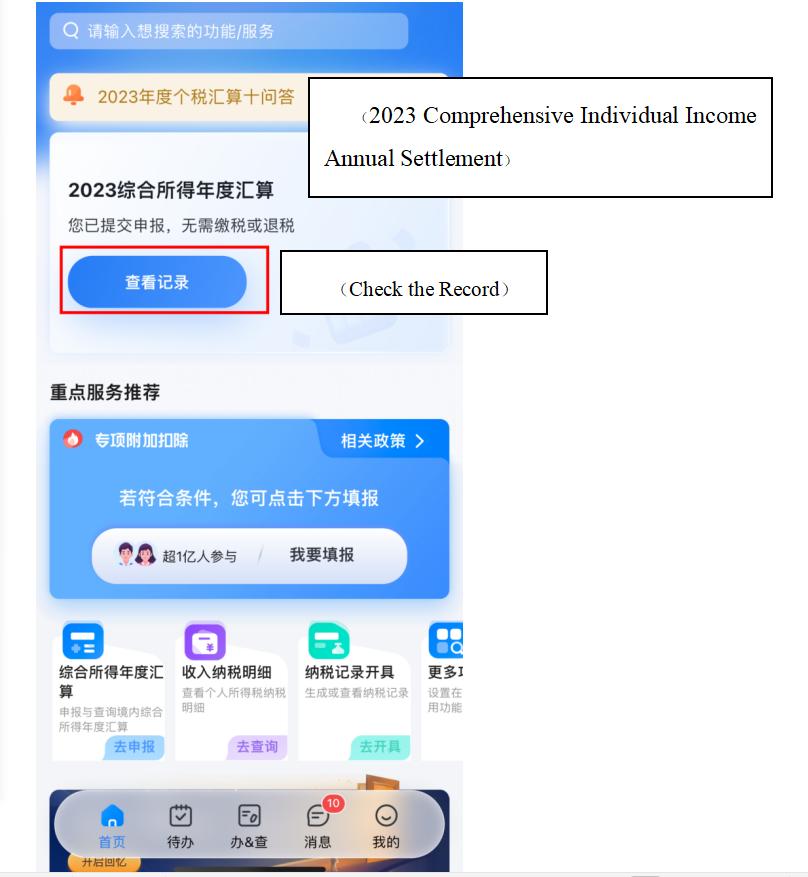 图1
图1方法2(Method 2)
在个税APP“办&查”页面,点击【申报记录】,在【已完成】的申报记录中选择【2023年度综合所得年度汇算】查看申报记录详情。
(Click on [Declaration Record] on [Handle & Check] page in the App. Then click on [Completed] and choose [2023 Comprehensive Individual Income Annual Settlement] to view details of your declaration.)
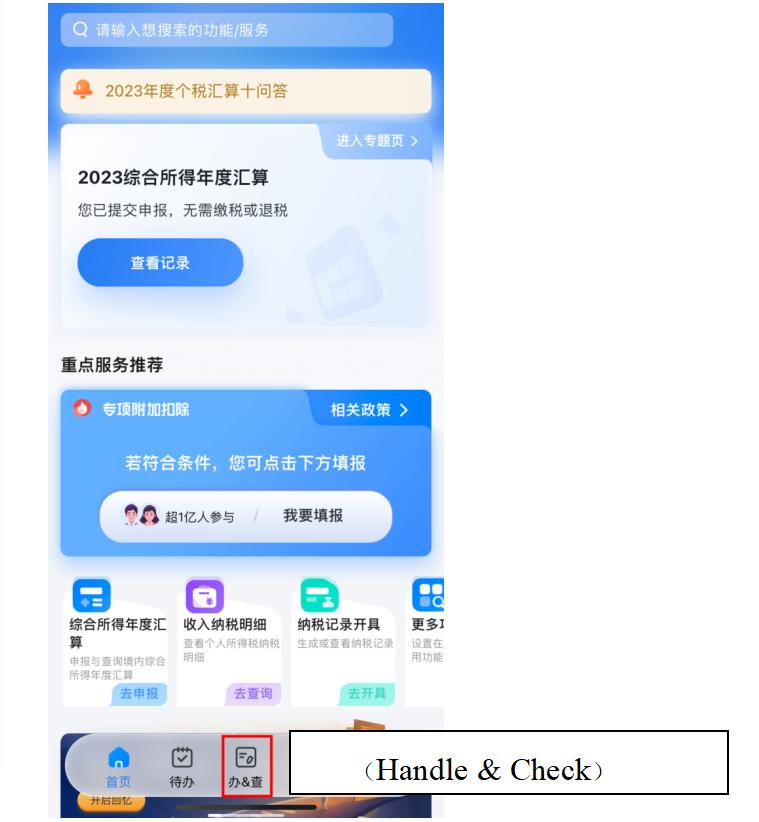 图2
图2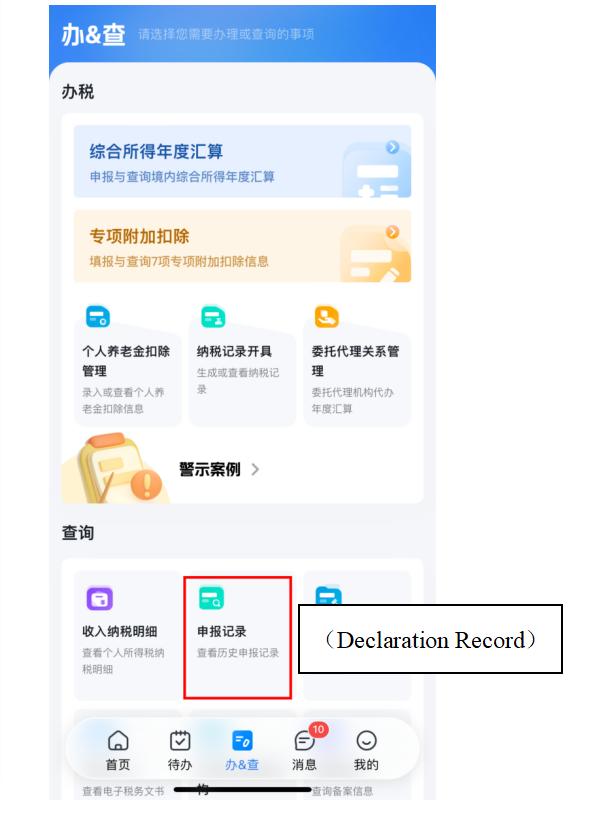 图3
图3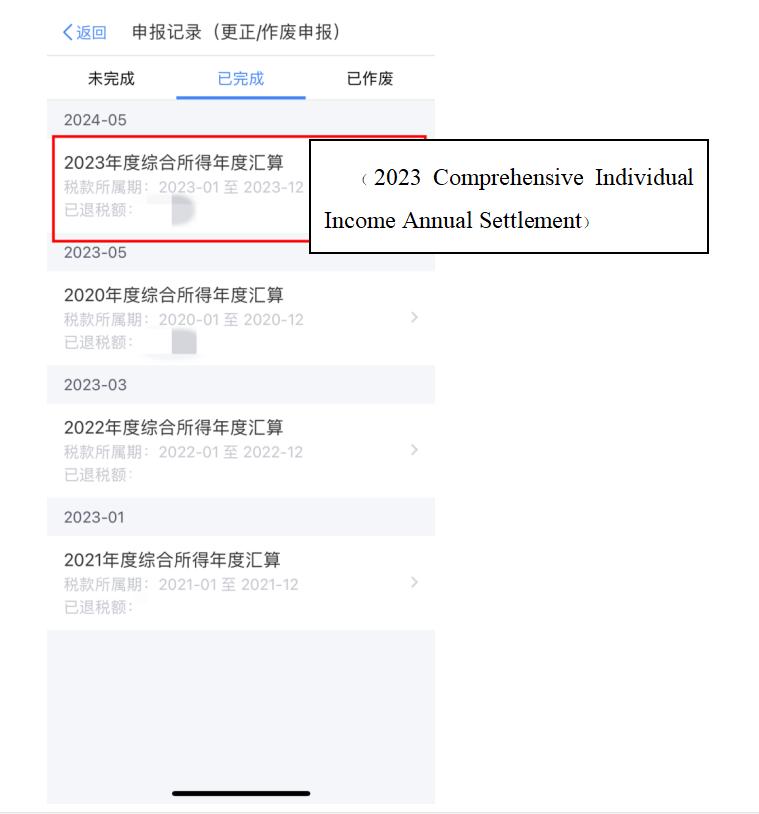 图4
图402
更正&作废申报具体操作
(Detailed Instructions of
Cancellation and Correction
of Declaration)
情况一(Scenario 1)
申报成功,但尚未补缴税款或无退税金额,可选择更正申报,也可选择作废申报,然后重新申报。
(If the declaration has been submitted, but you haven’t paid the tax owed yet, or the amount of refunds was 0, you could choose either to correct the declaration or to cancel the declaration, and then you can resubmit the declaration. )
操作:打开2023年度综合所得年度汇算的申报记录详情,点击下方【作废】或【更正】。
(Instruction: After clicking on “2023 Comprehensive Individual Income Annual Settlement”, you will find the details of your declaration, look down and click on [Cancellation] or [Correction]. )
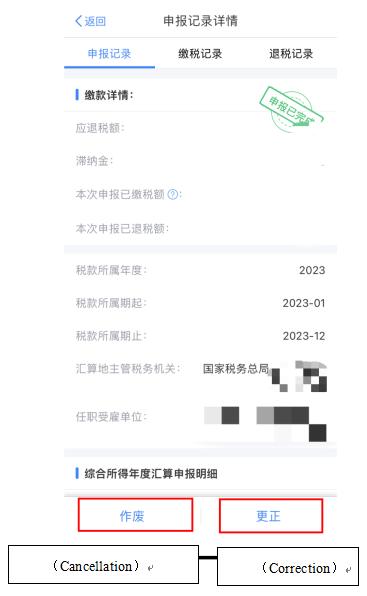 图5
图5注:作废数据不可恢复,可重新进行填报。
(Tips: If you choose to cancel the declaration, the information cannot be recovered after deletion. You need to refill the form manually. )
情况二(Scenario 2)
申报成功,但退税进度显示“税务审核中”,需要先撤销退税申请,再办理更正申报。
(If the declaration has been submitted and the progress of tax refund is shown as “under the review of tax official”, you have to withdraw the application first, and then go on to correct the declaration.)
操作:(Instruction:)
第一步:撤销退税(First step: Cancel the tax refund application)
打开个税APP首页,在【2023综合所得年度汇算】专题页点击【查看进度】,点击【撤销退税】。
(Open Individual Income Tax App, click on [View the Progress], then click on [Cancel Tax Refund] on the bottom of the page.)
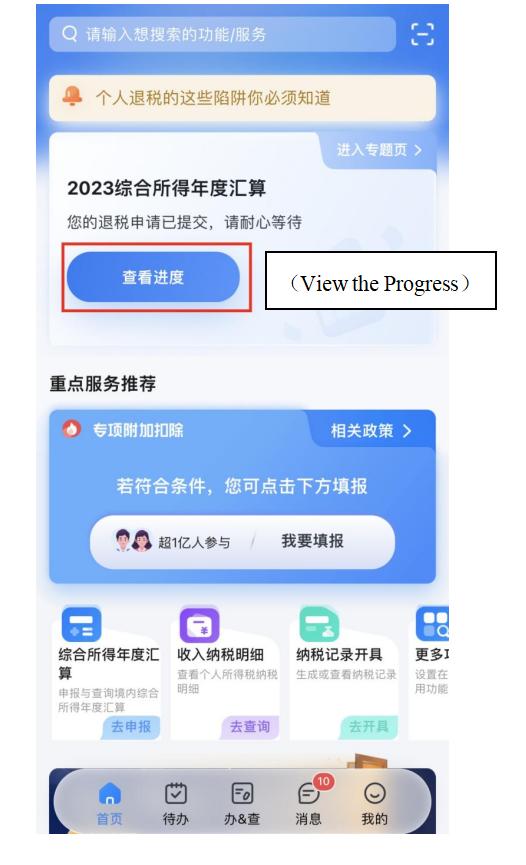 图6
图6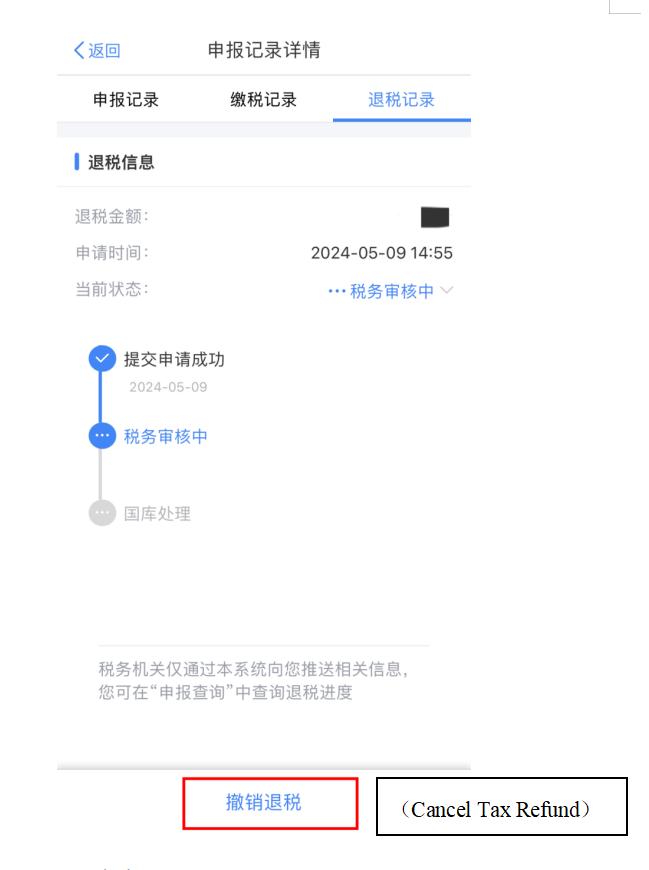 图7
图7第二步:更正申报(Second step: Correct the declaration)
进入申报记录界面,点击相应申报记录,点击【更正】。(After clicking on [2023 Comprehensive Individual Income Annual Settlement] and entering the interface of declaration details, click on [Correction] )
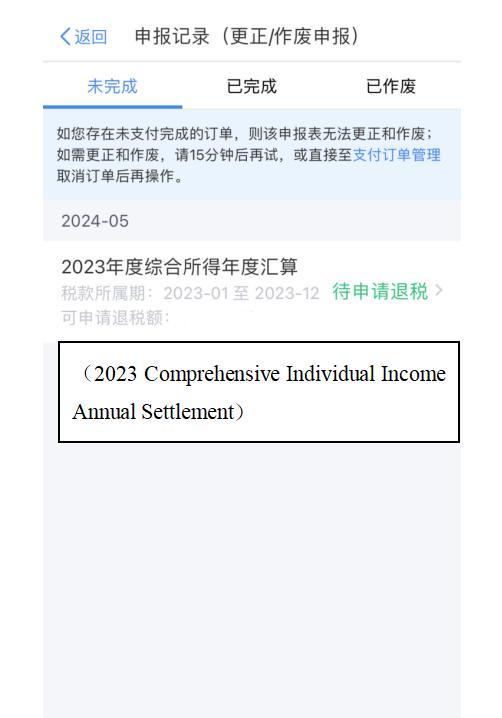 图8
图8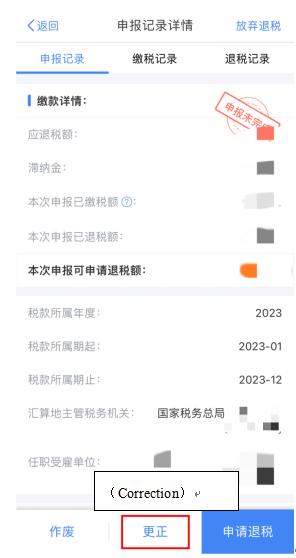 图9
图9情况三(Scenario 3)
申报成功,且已退税或补税成功,可以直接更正申报。
(If you have successfully declared and paid your tax owed or have successfully received the tax refund, you can directly make the correction.)
操作:打开2023年度综合所得年度汇算的申报记录详情,点击【更正】。
(Instruction: enter [Declaration Record Detail] and click [Correction])
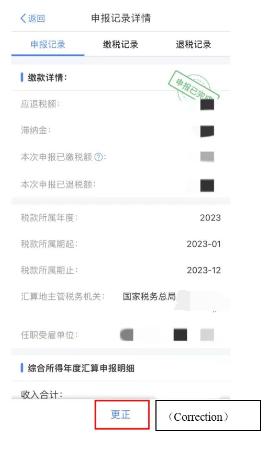 图10
图1003
温馨提示:(Tips:)
1.年度汇算期间每月您可在手机APP端更正、作废申报的次数上限只有5次。
(During the period of individual income tax annual settlement, one can make cancellation or correction on the APP for at most five times every month.)
2.超过上限后如需更正或作废申报,需前往主管税务机关办税服务厅办理。请您核对好信息谨慎操作。
(If you need to make cancellation or correction when there is no more chance, you can go to the tax service hall to make settlement. Please make sure the information is correct.)
供稿:宋钊悦 刘兴林 邹高迪
制作:窦露露
继续滑动看下一个轻触阅读原文
 上海税务向上滑动看下一个
原标题:《【双语话个税】一文搞定个税APP年度汇算更正&作废申报操作!》
本文为澎湃号作者或机构在澎湃新闻上传并发布,仅代表该作者或机构观点,不代表澎湃新闻的观点或立场,澎湃新闻仅提供信息发布平台。申请澎湃号请用电脑访问http://renzheng.thepaper.cn。







- 报料热线: 021-962866
- 报料邮箱: news@thepaper.cn
互联网新闻信息服务许可证:31120170006
增值电信业务经营许可证:沪B2-2017116
© 2014-2026 上海东方报业有限公司